
Crew Payroll OS Plus · v1.0 · 2026 Edition
Stop typing payroll by hand. See where the labor money goes.
Turn your crew’s texted hours into payroll-ready rows without typing them in by hand. Catch the mistakes before payday, and finally see what labor actually costs.
- AI Import for the hours your crew texts you, so no more retyping hours at midnight
- Catches payroll mistakes before they hit a check
- Shows real, loaded labor cost by job, employee and month
- Built for landscaping, lawn and tree crews (1–4 crews)
- AI Import
- Validation before payday
- Loaded labor cost
- Cost by property
- Cost by employee
- Monthly history
- Year-end carry forward
The most valuable part01
Know where the money goes. Every week.
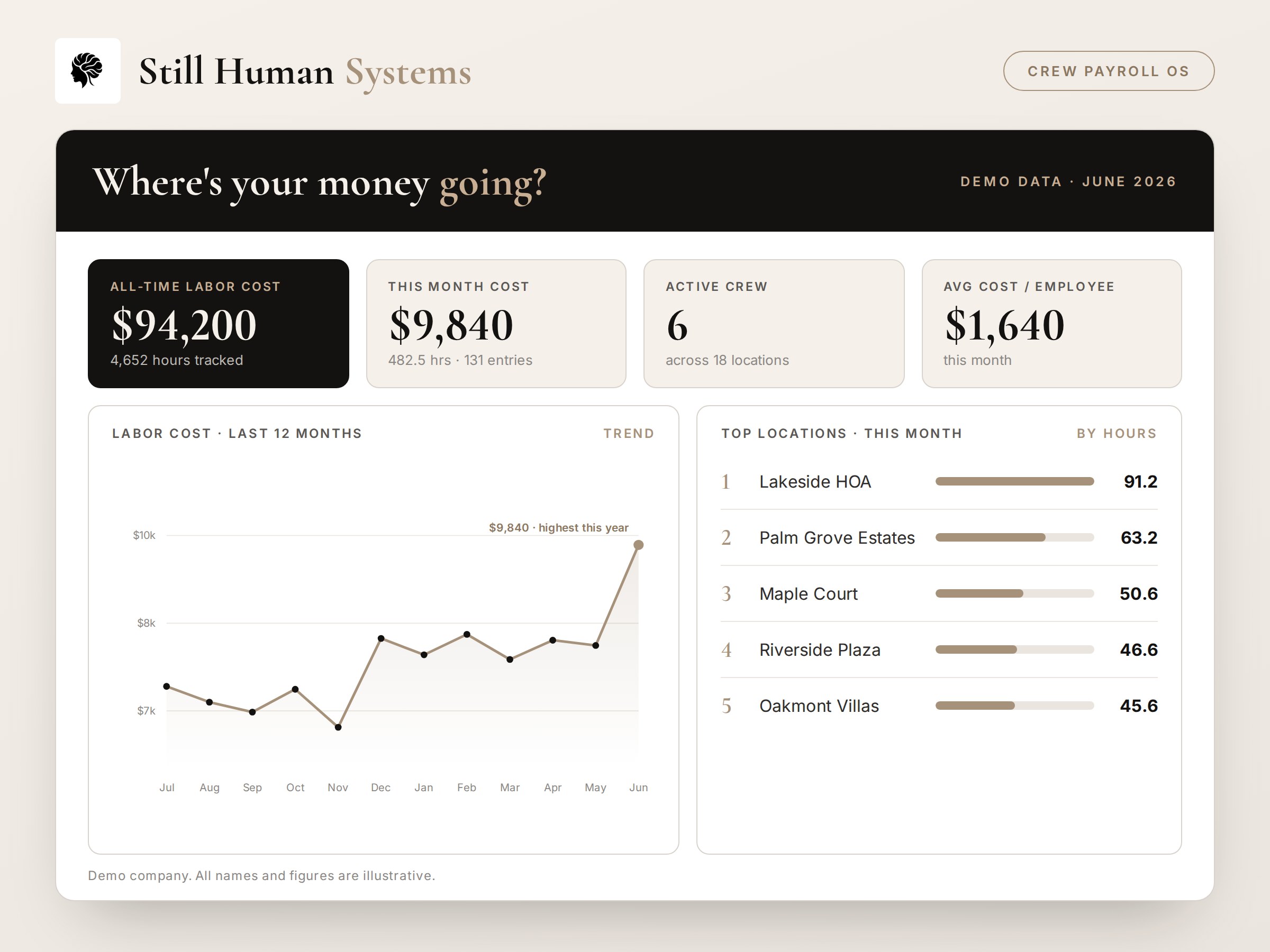
Payroll tells you what you paid. Crew Payroll OS shows you what it cost, and where. Not the wage: the real, loaded cost of labor, by property, by employee and by month.
- By property and jobSee which accounts eat the most crew hours, and which ones cost more than they look.
- By employeeHours and loaded cost per person, so overtime and long days don’t hide.
- By monthA running history, so you see a crew running long or overtime creeping before it becomes a problem.
The Thursday-night ritual02
It’s late, the crews are home, and you’re still typing.
Even after all that, you still don’t know what any of it cost you.
You’ve got a string of group-chat messages, a couple of texts, a notebook page, and your own memory. Somewhere in there is everybody’s hours for the week.
So you start typing. One name at a time.
Hoping you didn’t skip anyone. Hoping you read “7 to 3:30” right. Hoping you don’t shortchange somebody, or pay them for time they didn’t work.
By the time it’s done it’s late, you’re not completely sure it’s right, and you’ll do the whole thing again next week.
What changes03
Same crew. Same messages. A different Thursday night.
You’ve probably tried an app for this and quit after three weeks, because it turned you into a data-entry clerk. The hours still had to be typed in by somebody, and that somebody was you. Crew Payroll OS removes that part.
The way it works now
- Read hours off twelve scattered messages, late at night
- Type every name and number in by hand
- Catch mistakes only after a check is wrong
- Pay a number you hope is close, with no idea of true cost
- Do the whole thing again next week
The way it works with Crew Payroll OS
- The AI you already use structures the messages for you
- Paste, review, approve, with no retyping
- Mistakes get flagged before payday
- See real, loaded labor cost by job and employee
- Get your Thursday night back
AI Import04
Your crew already sends their hours. Stop retyping them.
Copy the messages, run them through the AI tool you already use (ChatGPT or Claude) with the import prompt built into Crew Payroll OS Plus. They come back as clean, structured payroll rows. Paste those in, review, and approve.
No retyping. No squinting at “7 to 3:30” across twelve messages at midnight. And it reads the way real crews actually communicate, including the mixed English and Spanish that landscaping and tree crews really send.
It works with the AI you already use, so there’s no AI subscription to us and no AI fees to us, ever.
ChatGPTClaude
- iCopy
Copy your crew’s messages, exactly as they sent them.
- iiPaste to AI
Drop them into your own AI tool with the included import prompt.
- iiiStructure
The AI turns the mess into clean payroll rows: names, dates, hours.
- ivImport
Paste the result back into Crew Payroll OS.
- vApprove
Review what it flags, check it against the original messages, and approve.
See it in action05
What you actually get.
A calm, owner-friendly system. Not a spreadsheet you fight, not enterprise software you’ll never finish setting up.
Illustrations of the workbook views, with demo data.
What else it does06
The whole payroll night, handled.
One system that takes you from raw crew messages to clean, approved, ready-to-pay totals, and shows you the truth underneath them.
Catches mistakes before payday
It flags the impossible hours, the day that’s missing, the name entered twice, the number that doesn’t add up, all before it ever reaches a check.
Shows what labor really costs
Not the wage. The real, loaded cost by job, by employee, and by month, so you can finally see where the money actually goes.
Keeps your history
Look back across weeks and months. See what’s drifting (overtime creep, a crew running long) before it becomes a real problem.
Runs the full payroll workflow
From raw crew messages to clean, approved, ready-to-pay totals in one place, in a fraction of the time it takes you now.
No subscription. No surprises.07
Buy it once. The edition is yours.
Every month, another software company wants $49, $99, or $299 out of your account. Crew Payroll OS Plus isn’t another bill. You buy the 2026 Edition once, you own it, and it doesn’t expire or stop working.
At year end, the built-in continuity process carries your records into a fresh payroll year: last year archived, a clean year in front of you. New annual editions are released separately, so each year you decide whether a newer one is worth it. Founding customers are the exception (see pricing).
Your workbook and records stay in your own files, on your computer or in your own OneDrive.
- Own your system
- Own your data
- Use the AI tools you already have
- No subscription to Still Human Systems
Crew Payroll OS Plus
$99Founding Edition · one-time
$99 for the first 50 Founding customers. Once those 50 are claimed, the standard price is $149. No subscription, ever.
What’s included
- Crew Payroll OS Plus v1.0 · 2026 Edition workbook
- READ ME FIRST
- Owner’s Guide v1.0
- AI Import Prompt v1.0
- Release Notes v1.0
- Complete 14-video English training library
- Built-in validation workflow
- Year-end continuity process
First 50 customers. Includes the 2026 Edition, improvements released to it, and the 2027 Edition at no additional cost.
After the first 50. Includes the current edition being sold. The 2027 Edition is a separate annual release and is not included.
Runs in Microsoft Excel: desktop Excel (2019 or newer, or Microsoft 365) and Excel for the web. Not designed for Google Sheets. Questions before you buy? Email hello@stillhumansystems.com.
Before you buy, the plain facts
It runs in Microsoft Excel. It’s an Excel workbook, not a separate app. Use it in desktop Excel (2019 or newer, or Microsoft 365) or in Excel for the web. Phones, tablets, Google Sheets and Apple Numbers haven’t been tested and aren’t supported yet.
It is not a payroll processor. It does not file payroll taxes, does not send employee payments, and does not replace your payroll provider.
AI Import uses your account. You run the import prompt in your own ChatGPT or Claude account. Your crew’s messages never pass through Still Human Systems.
You review before you approve. Check AI-generated entries against the original records, and confirm your payroll rules and overtime setup with your payroll provider or a qualified professional.
Free · Start here
Not ready yet? Start with Crew Hours Lite.
See what your hours actually cost with the free tracker, then step up to Crew Payroll OS Plus when payroll night gets to be too much.

Who’s behind it
I’m not a coach, and I’m not a software company.
I manage payroll, workers’ comp audits, labor tracking, and operations for a real landscaping business in South Florida. Crew Payroll OS was built out of the same spreadsheets, group-chat messages, and payroll headaches we deal with every week.
I built it because I needed it. It’s the tool I wished I’d had at nine o’clock on a Thursday night.
Yanny Leal · Built by an operator, for operators
Straight answers
Questions, answered plainly.
How does the import actually work?
Five quick steps, no retyping: copy your crew’s messages; paste them into the AI tool you already use, along with the import prompt included in Crew Payroll OS Plus; the AI structures them into payroll rows; paste the result into Crew Payroll OS Plus; check the entries against the original messages, then approve. The work that used to take your whole Thursday night takes a fraction of it.
Do I need to pay for AI?
You use your own AI account (ChatGPT or Claude), likely one you already have. There’s no AI fee paid to us, ever. If you run a larger crew, a paid plan on the AI tool you choose may be worth it, but that’s between you and that tool, not another bill from Still Human Systems.
Is this a subscription?
No. You buy the 2026 Edition once and own it, with no monthly billing. New annual editions are released separately, so nothing renews automatically and nothing gets charged to you again unless you decide to buy a later edition.
What happens next year?
The 2026 Edition you bought keeps working, and the built-in year-end continuity process carries your records into a fresh payroll year: last year archived, a clean year ahead. The 2027 Edition is a separate annual release. It is included at no additional cost for the first 50 Founding customers. Customers who buy at the standard price after that group can choose whether to pick it up when it’s released.
Where does my data live?
In your own files: on your computer, or in your own OneDrive if you use Excel for the web. Your employees, rates and history don’t sit on a Still Human Systems server. If you use AI Import, the messages you paste go to your own ChatGPT or Claude account under that service’s terms.
Does it schedule or dispatch crews?
No. It handles payroll: hours in, accurate totals out. Scheduling is a different tool, and we’d rather tell you now than disappoint you later.
What if my crew’s messages are messy?
They usually are. The import is built to read them, including in Spanish, and show you anything to double-check before you approve. Messy is the normal case, not the exception.
Do I have to change how my crew reports their hours?
No. The point is that you don’t. They keep texting the way they already do.
What do I need to run it?
Microsoft Excel, either desktop Excel (2019 or newer, or Microsoft 365) or Excel for the web with a Microsoft account, plus a ChatGPT or Claude account if you use AI Import.
Does this replace my payroll company?
No. Crew Payroll OS Plus is not a payroll processor. It does not file payroll taxes and it does not send payments to your employees. It gets you accurate, verified hours and totals to hand off, so keep your payroll provider and confirm your payroll rules and overtime setup with them or with a qualified professional.
How accurate is the AI import?
Good enough to save you the typing, not good enough to trust blindly. Nobody can guarantee AI accuracy, which is why the workflow ends with you: the import flags what looks off, and you check the entries against the original messages before approving. The validation checks run on top of that.
Stop typing payroll by hand. Get your Thursday night back.
Crew Payroll OS gives you back the night you spend typing it all in, and shows you what it actually cost while it’s at it.